

Once your Firestick is set up, pair it with a trustworthy IPTV subscription in Canada.
Written by the StreamX Editorial Team — Updated October 2026
“Jailbroken Firestick” is one of the most searched phrases in Canadian cord-cutting — and one of the most misunderstood. There is no real jailbreak involved. “Jailbreaking” a Fire TV Stick simply means turning on a developer setting that lets you install Android apps from outside the Amazon Appstore, a process called sideloading. It does not hack the device, void your warranty or unlock free channels. This guide explains what it really is, which Fire TV models still allow it in 2026, how to do it safely and what to avoid.
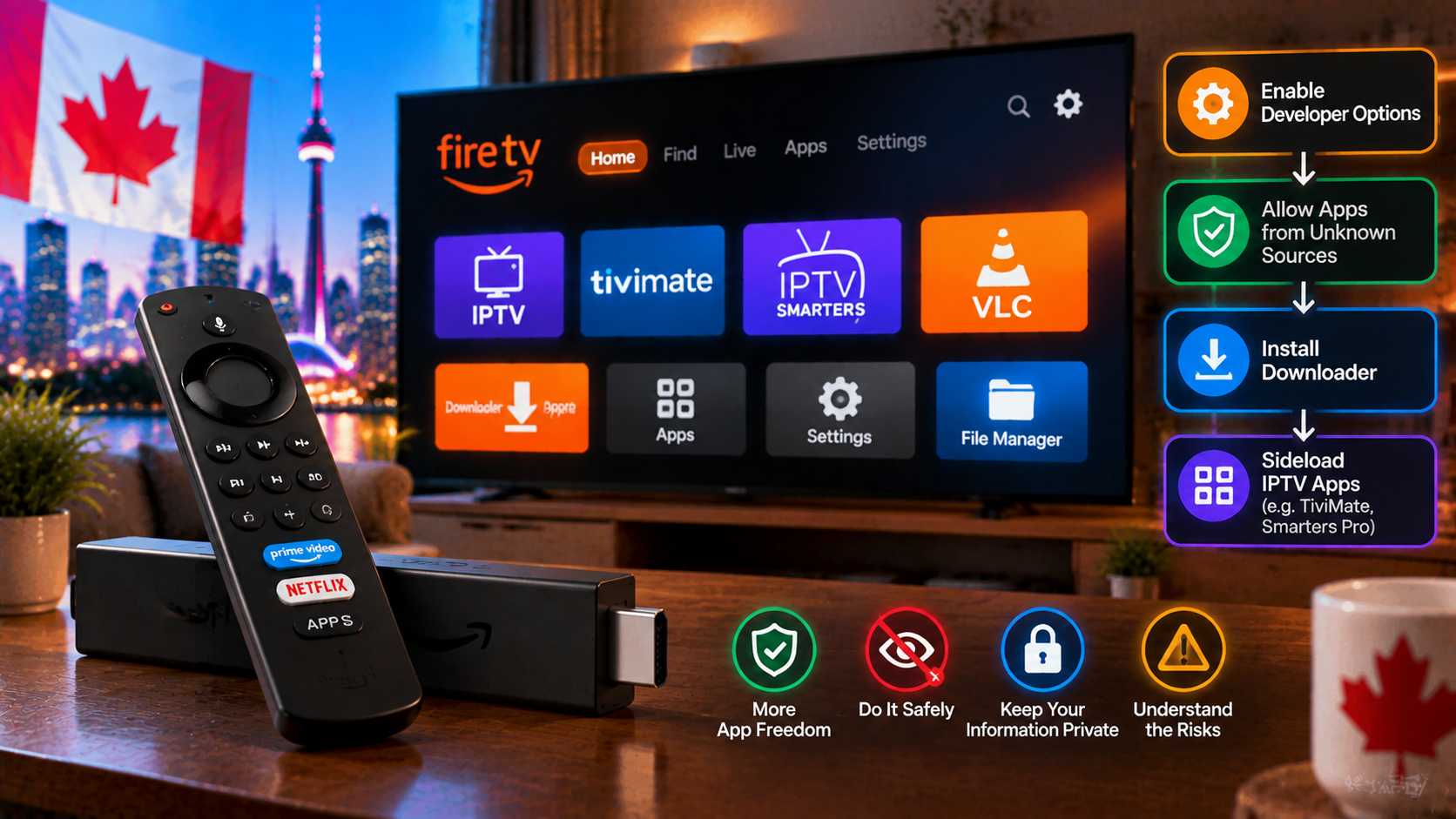
Quick answer: On a Fire OS device (Fire TV Stick 4K Max, 4K Plus, Fire TV Cube or older Fire OS sticks), go to Settings > My Fire TV > About and click the device name seven times to enable Developer Options. Install the Downloader app from the Amazon Appstore, then allow it under Developer Options > Install unknown apps. You can now sideload apps like TiviMate from their official sources. Vega OS sticks such as the Fire TV Stick 4K Select cannot sideload. Avoid “jailbroken” sticks sold pre-loaded with apps and channels.
What “Jailbreaking” Actually Means
| Myth | Reality |
|---|---|
| It hacks the Firestick | It uses a built-in Amazon developer setting |
| It gives free TV | It only lets you install apps; channels still come from a service |
| It voids the warranty | Enabling a built-in setting does not modify the device |
| It is illegal | Sideloading apps is legal; what matters is the content you access |
Which Fire TV Devices Can Sideload in 2026?
Amazon began moving its sticks to Vega OS, a Linux-based system that does not allow sideloading, starting with the Fire TV Stick 4K Select in late 2025, as Pocket-lint reported.
| Can sideload (Fire OS) | Cannot sideload (Vega OS) |
|---|---|
| Fire TV Stick 4K Max, Fire TV Stick 4K Plus, Fire TV Cube, older Fire OS sticks | Fire TV Stick 4K Select, new Fire TV Stick HD |
Check your model under Settings > My Fire TV > About. Buying a new stick? Read our best Firestick for IPTV guide.
Step-by-Step: Enable Sideloading Safely
- Update your Fire TV: Settings > My Fire TV > About > Check for Updates.
- Enable Developer Options: Settings > My Fire TV > About, then click your device name seven times until “You are now a developer” appears.
- Install Downloader: search the Amazon Appstore for “Downloader” (by AFTVnews) and install it.
- Allow Downloader: Settings > My Fire TV > Developer Options > Install unknown apps > Downloader: ON.
- Download apps only from official developer sources — for example TiviMate or Kodi’s official sites.
- Install, then delete the APK when Downloader asks, to save space.
- Turn “Install unknown apps” back off when you are done.
Our detailed walkthroughs: install IPTV on Firestick, TiviMate setup and Kodi setup.
The Best Apps to Sideload for IPTV
Turning on sideloading is only step one — the apps are what matter. Almost everyone starts by sideloading the Downloader app from the Amazon Appstore (that one is official), then uses it to install the IPTV players below.
- Downloader — the free tool that lets you type a URL and install an APK. Install this first from the Appstore; it does the rest.
- TiviMate — the most popular premium player for a cable-style guide, favourites and recording. See our TiviMate setup guide for Canada.
- IPTV Smarters Pro — a free, beginner-friendly player that logs in with an Xtream or M3U line. Our IPTV Smarters setup guide walks through it.
- VLC — handy for quickly testing an M3U playlist before committing to a paid player. See how to use VLC for IPTV.
You do not need all four. Most people sideload Downloader, then add TiviMate or Smarters as their main player and keep VLC around for testing.
The Real Risks — and How to Avoid Them
- Malware in modified apps: “mod”, “premium unlocked” or “cracked” APKs from random codes can contain adware or worse. Use official sources only.
- Pre-loaded “jailbroken” sticks: sticks sold on Marketplace with apps and channels already installed often contain unknown software and unlicensed services. Buy a new stick from a reputable retailer.
- Unlicensed add-ons and services: the device setting is legal, but the content you access must be authorized. See licensed vs unlicensed IPTV (general information, not legal advice).
- Privacy: check app permissions and uninstall anything you do not recognize. The Government of Canada’s Get Cyber Safe site has practical security tips.
After Sideloading: Keep It Running Well
- Clear app caches regularly — see our Firestick cache guide.
- Keep 1–2 GB of storage free.
- Restart weekly.
- Update sideloaded apps from the same official sources.
Do You Even Need to Sideload?
Not always. IPTV Smarters-style players and some other IPTV apps appear in the Amazon Appstore from time to time, and Android TV boxes install popular players straight from Google Play. If you would rather avoid sideloading entirely, see our Firestick vs Android box comparison.
Get Started
Once your Firestick is ready, test StreamX with a free 24-hour trial, then choose a plan on our pricing page.
Frequently Asked Questions
What does jailbreaking a Firestick mean?
It means enabling Developer Options so you can sideload Android apps from outside the Amazon Appstore. It does not hack the device or unlock free channels.
Is jailbreaking a Firestick legal in Canada?
Enabling sideloading is a built-in setting and legal. What matters legally is the content you access with the apps you install.
Can I jailbreak a Fire TV Stick 4K Select?
No. The Fire TV Stick 4K Select runs Vega OS, which only allows apps from the Amazon Appstore.
Is it safe to sideload apps on a Firestick?
Yes, if you only install apps from official developer sources and avoid modified or cracked APKs.
Should I buy a pre-jailbroken Firestick?
No. Pre-loaded sticks often include unknown apps and unlicensed services. Buy a new stick and set it up yourself.
Which app should I use after sideloading?
For most people, TiviMate (polished, paid) or IPTV Smarters Pro (free, simple) is the main player. Sideload the Downloader app first, then install whichever one suits you — our TiviMate and IPTV Smarters guides cover both.
Will sideloading slow down or harm my Firestick?
Sideloading itself does not harm the device — you are only installing extra apps. What slows a Firestick down is clutter and a full cache over time. If yours gets sluggish, see our guide to clearing the cache on a Firestick.
Do I need a VPN on a jailbroken Firestick?
It is optional. A VPN does not make sideloading “legal” or “illegal” either way; some Canadians simply prefer the added privacy on their connection. Our best VPN for IPTV guide lays out the trade-offs.







